VaultMate
Local-first encrypted credentials manager for developers. Your API keys, passwords, and secrets — encrypted on your machine, readable by your AI.
macOS Apple Silicon (M1–M4). Intel Mac? · Windows .msi
AES-256
Encryption Standard
100%
Local — No Cloud
v1.0
Current Version
MIT
Open Source License
Live preview
The app in action.
Real screens from the desktop app — the vault list, credential editor, and MCP server settings.
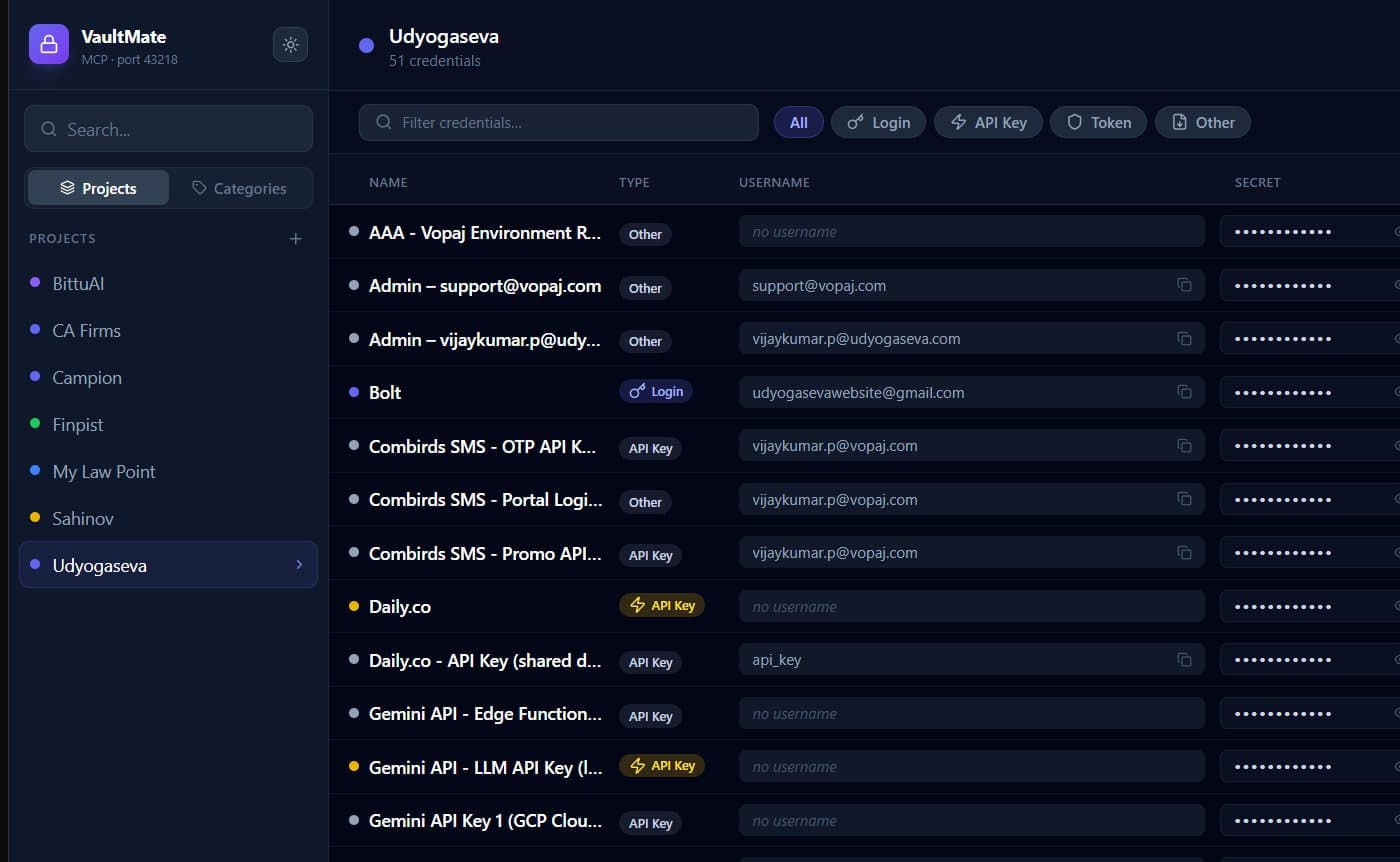
Vault
Projects on the left, credentials grid on the right — every secret encrypted at rest.

Credential
Edit a credential — name, type, secret, project, notes. MCP path one-click copy.

MCP Server
Local MCP endpoint exposes the vault to Claude Code — read-only, never leaves your machine.
The Problem
Developers juggle dozens of API keys, database passwords, OAuth secrets, and tokens across multiple projects. They scatter across .env files, get accidentally committed to git, or get copy-pasted into terminals that keep them in shell history forever. Existing password managers are built for browsers — not developer workflows.
What VaultMate Does
VaultMate is a native desktop app that stores all your credentials in a local, AES-256-GCM encrypted SQLite database — never synced to the cloud. It ships with a built-in MCP server so Claude Code and other AI assistants can read credentials on-demand without copy-pasting into prompts. Organise by project, filter by category, and always know where your secrets are.
Features
Built for how developers actually work.
AES-256-GCM encryption
Every credential is encrypted at rest. Data never leaves your machine.
MCP server built in
Claude Code reads your credentials directly — no copy-pasting, no .env juggling.
Local SQLite database
No cloud sync, no subscriptions. Your credentials live on your disk, under your control.
PIN-protected vault
Set a master PIN to lock the app. Auto-locks after inactivity.
Project-based organisation
Group credentials by project. Filter by category — API Key, OAuth, Database, Token.
Native performance
Built with Tauri + Rust. Starts in under a second. Near-zero memory footprint.
AI-Native Design
Claude Code reads your credentials — you never have to paste them.
VaultMate exposes a built-in MCP (Model Context Protocol) server. Add it to your Claude Code configuration once, and Claude can fetch any credential from your vault by name — without you ever copying and pasting a secret into a terminal or prompt.
Tech Stack
Platform Support
- Windows 10/11 (x64) — NSIS .exe and MSI installer
- macOS Apple Silicon (M1–M4) — DMG package
- macOS Intel — DMG package
- Linux — .deb, .rpm, and AppImage builds
Free and open source.
VaultMate is MIT-licensed. Download the installer, read the source, or build from scratch — it is all on GitHub.